
Technical SEO 101: Complete Guide For 2026

Technical SEO is the practice of making a website discoverable, crawlable, renderable and indexable, so that a search engine can store its pages and serve them for the right queries to the right audience.
Infact, every technical SEO task covers one of those steps.
If you are new to this, start here. You do not need a developer’s background to follow this guide. You need a site, and a suspicion that something on that site is not working.
If you already run a site with problems, this guide is built for you as well. The parts of technical SEO are not a flat list of equal items. They are a sequence.
Discovery comes before crawling, crawling before rendering, rendering before indexing, and indexing before any ranking at all. Fix them out of order and you spend money on the wrong thing.
A faster page that Google has excluded from its index is still excluded.
This guide follows that order. It defines technical SEO and separates it from on-page and off-page work. It answers whether technical SEO moves rankings, then walks the stages of how search engines work process: discover, crawl, render, index, serve.
AI search sits inside that process, not beside it, so it gets its place there too.
A diagnostic then shows you which stage a page is stuck at, followed by the audit, how often to run one, and the tools you required.
One thing before you start.
If your site has fifty pages, part of what large sites worry about (crawl budget, log files, faceted navigation) does not apply to you. The scope table near the end tells you which part you should focus.
Let’s dive in..
What Is Technical SEO?
Technical SEO is the work that lets search engines discover, crawl, render, index and serve your pages without obstruction. It covers the site’s infrastructure: server responses, directives, URLs, internal links, code, rendering method, page performance and markup. Technical SEO does not cover what your page says or who links to it.
What is technical SEO in simple terms?
In simple terms, technical SEO makes sure Google can reach your pages, read them as visitors see them, and keep them in its index. If a page fails any of those three, the quality of its writing does not matter. Google cannot rank a page it has never stored.
What is the difference between technical SEO and on-page SEO?
Technical SEO decides whether a page can enter the index; on-page SEO decides how relevant the page is once it is there.
On-page SEO works on the content of a single page: the title tag, the headings, the copy, the entities the page names, and the answer it gives.
Technical SEO works on the conditions around that content: whether the URL returns a 200 status code, whether a directive blocks it, whether its JavaScript renders, and whether a canonical tag points somewhere else.
Off-page SEO is the third part.
Off-page work earns signals from outside your site, mainly links and brand mentions. The three are separate jobs with separate owners, and types of SEO are easier to manage once you see the dependency between them.
Technical SEO comes first because the other two need a stored page to act on.
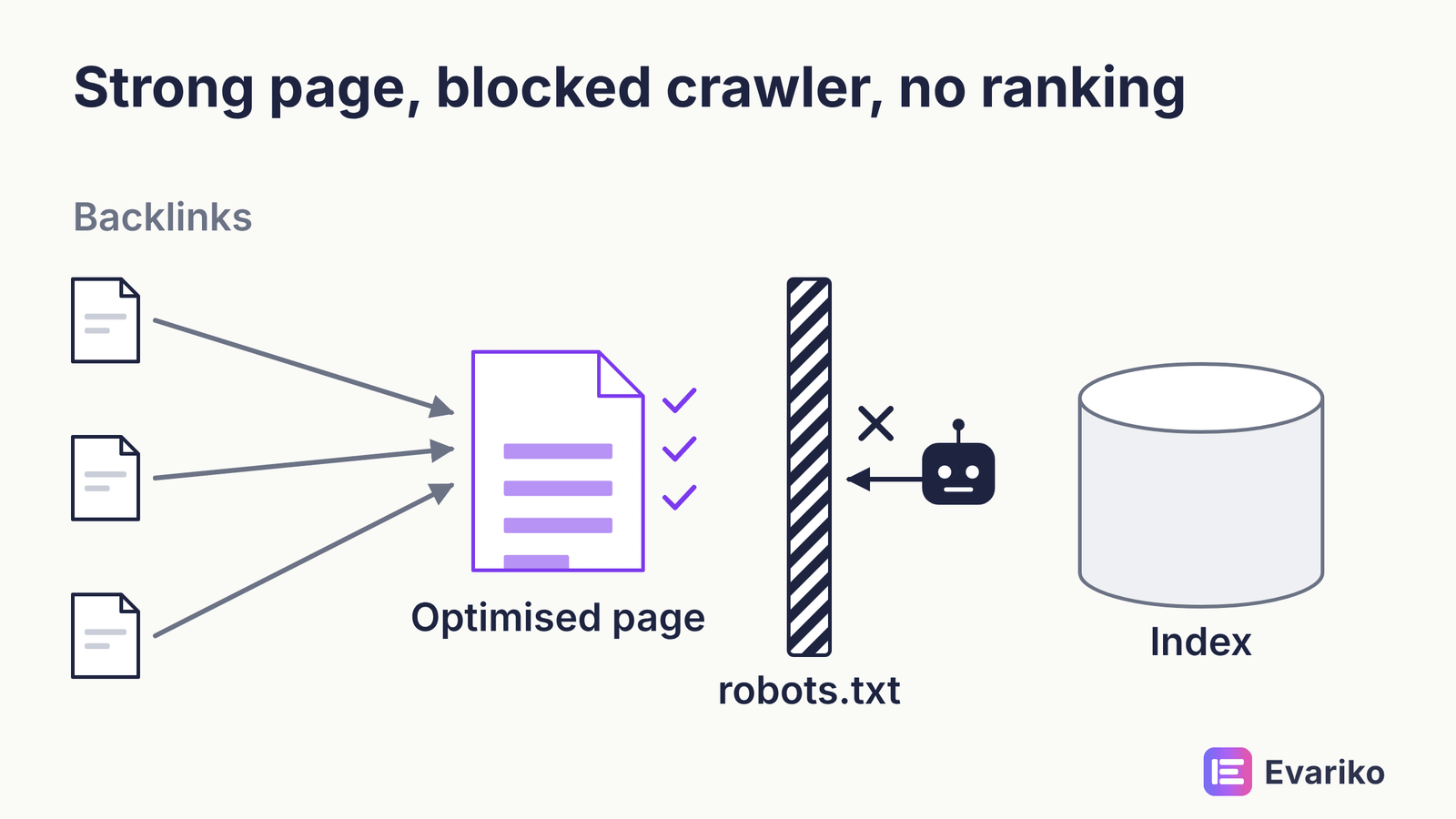
Strong on-page SEO on a page blocked by robots.txt earns nothing, and the same is true of off-page SEO pointed at a URL Google has excluded.
All three sit inside the wider discipline of search engine optimisation. If you want the full picture of what SEO is and how the parts combine, the pillar guide covers it. This page stays on the technical layer.
Does Technical SEO Directly Affect Rankings?
Most technical SEO work affects eligibility, not position. A page has to be crawled, rendered and indexed before Google can rank it at all. Technical fixes remove the obstacles to that. Once a page is eligible, its position depends mainly on relevance and quality, which are on-page and off-page matters.
You are probably thinking that every agency tells you technical SEO boosts rankings. Some of that is true. Most of it is not.
Which technical elements are confirmed ranking inputs?
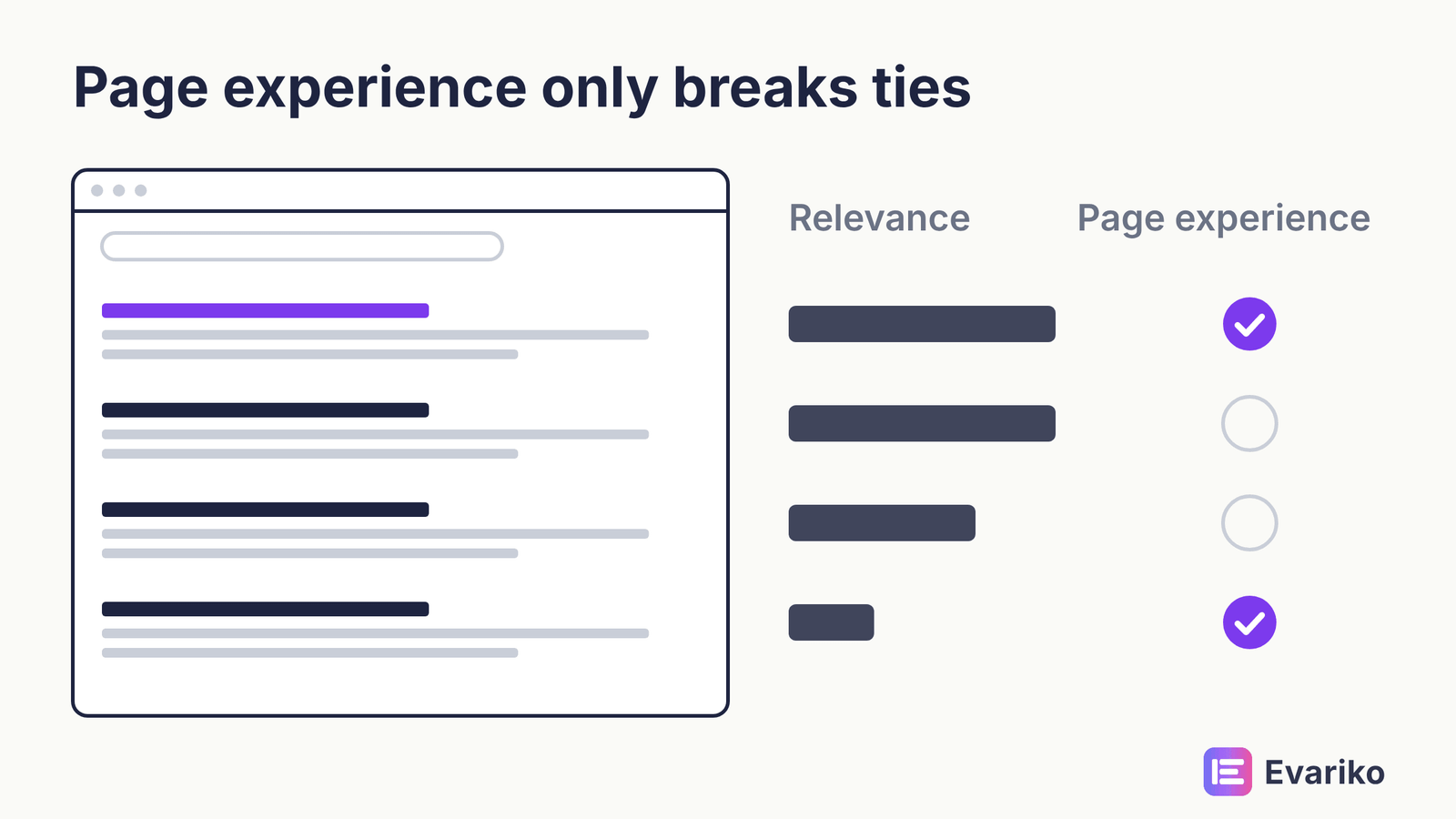
Google confirms only a small set of technical elements as inputs to its ranking systems, and Google describes their weight as light. Google’s page experience documentation states that “Core Web Vitals are used by our ranking systems.” The same documentation says that good results in the Core Web Vitals report do not guarantee top rankings, and that Google “always seeks to show the most relevant content, even if the page experience is sub-par.” Google announced HTTPS as a ranking signal in August 2014 and called it a very lightweight signal.
That is the honest list. Page experience helps most when several pages are equally relevant. It does not lift an irrelevant page past a relevant one.
What is the difference between an eligibility gate and a ranking signal?
An eligibility gate decides whether a page can appear in results at all; a ranking signal adjusts where an eligible page appears. Gates include crawl access, a 200 status code, the absence of a noindex directive, successful rendering, and canonical selection. Fail a gate and the page has no position to improve. Signals act only after every gate is passed.
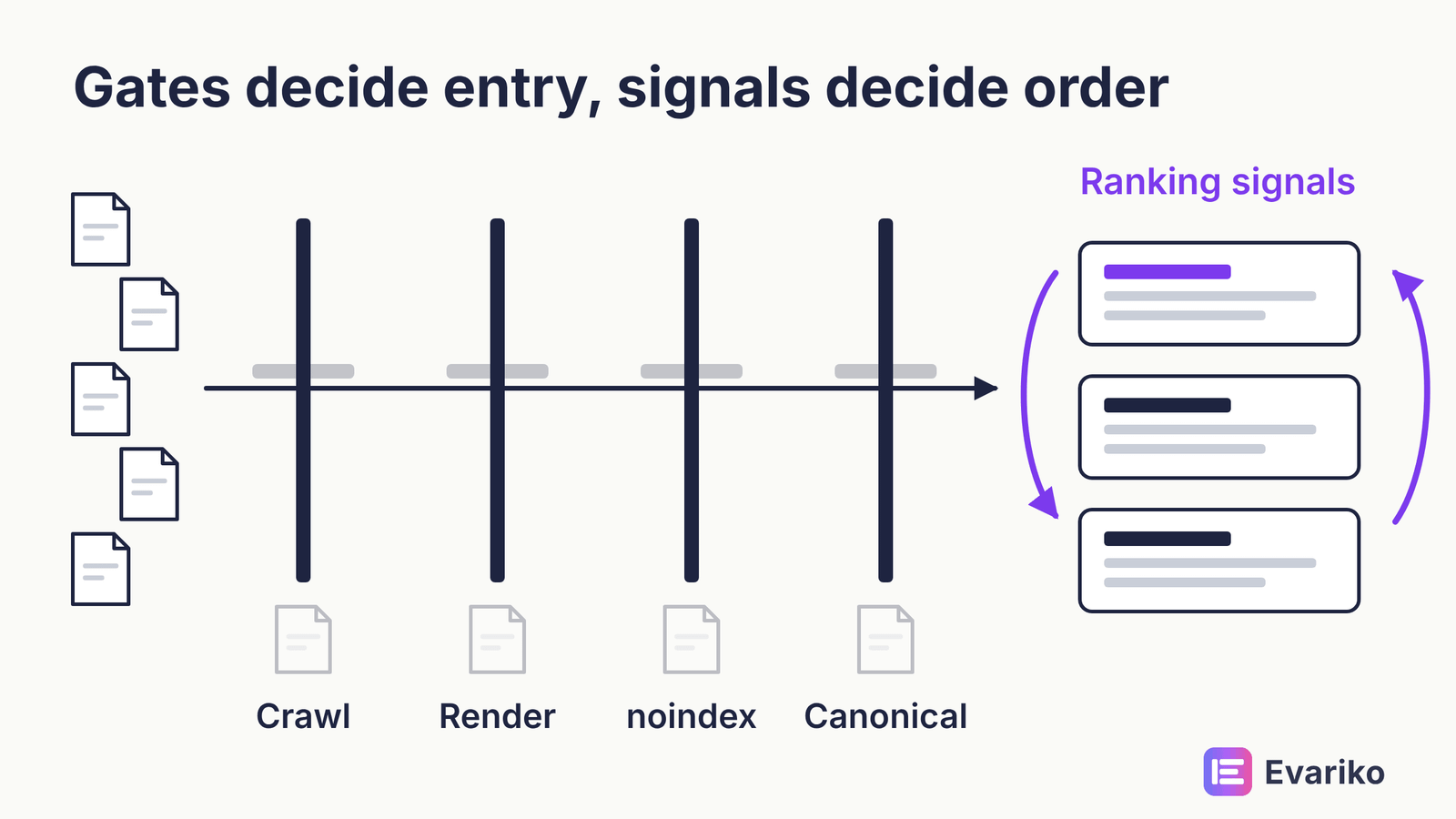
This distinction is how you should read the rest of this guide. When a section describes a gate, the fix is urgent if that gate is failing. When a section describes a signal, the fix matters less, and it matters only for pages that already pass every gate. Spending on Core Web Vitals for pages Google has not indexed is the most common waste of a technical budget.
A related point. Poor technical SEO does not cause a penalty. Google issues manual actions when a human reviewer finds a site in breach of Google’s spam policies.
Slow pages, broken canonicals and crawl errors are not spam policy breaches. They cost you visibility through the pipeline, not through punishment. The guide to Google ranking factors separates the confirmed inputs from the likely ones and the myths.
How Does Google Process a Website?
Google processes a website in five stages: it discovers a URL, crawls the URL, renders the page, indexes the rendered result, and serves the indexed page for matching queries. Each stage depends on the stage before it. A failure at any stage stops the page there.

Google’s own documentation describes three core stages (crawling, indexing and serving) and treats rendering as a separate phase in its JavaScript guidance. This guide splits discovery and rendering out on purpose. Those two stages are where modern sites fail most often, and failures you cannot name are failures you cannot locate.
| Stage | What the engine does | Typical failure |
|---|---|---|
| 1. Discover | Finds the URL through links, sitemaps or redirects | Orphan page, URL missing from sitemap |
| 2. Crawl | Requests the URL and receives a server response | Blocked by robots.txt, 5xx error, timeout |
| 3. Render | Runs the page’s code to build what a visitor sees | Content injected by JavaScript that fails or arrives late |
| 4. Index | Stores the rendered page and selects a canonical URL | noindex directive, duplicate, another URL chosen as canonical |
| 5. Serve | Ranks the indexed page and displays the page for queries | Low relevance, weak quality signals, poor page experience |
The table reads top to bottom, and so should your work. If you want the deeper mechanics of how search engines crawl, index and rank pages, the explainer on Google’s processing covers them stage by stage.
What should you fix first?
Fix the earliest failing stage first, because nothing after that stage can work until it is fixed. In practice, the order is:
- Discovery: every page that should rank is linked internally and listed in the sitemap.
- Crawl access: robots.txt allows the page and the server returns a 200 status code.
- Rendering: the main content and links exist in the rendered HTML.
- Indexing: no noindex directive, a correct canonical tag, no unintended duplicates.
- Serving quality: Core Web Vitals, structured data, HTTPS and mobile parity.
The order applies to every site, from fifty pages to fifty million. What changes with size is how much work sits inside each step.
Can Search Engines Discover and Crawl Every Page That Matters?
Search engines discover and crawl your important pages only if your internal links point to those pages, your sitemap lists those pages, and your robots.txt file allows them. Crawlability is the condition of a page being reachable and fetchable. Indexability, covered further down, is the separate condition of being storable. The phrase “crawlability and indexability” pairs them because they fail in different places.
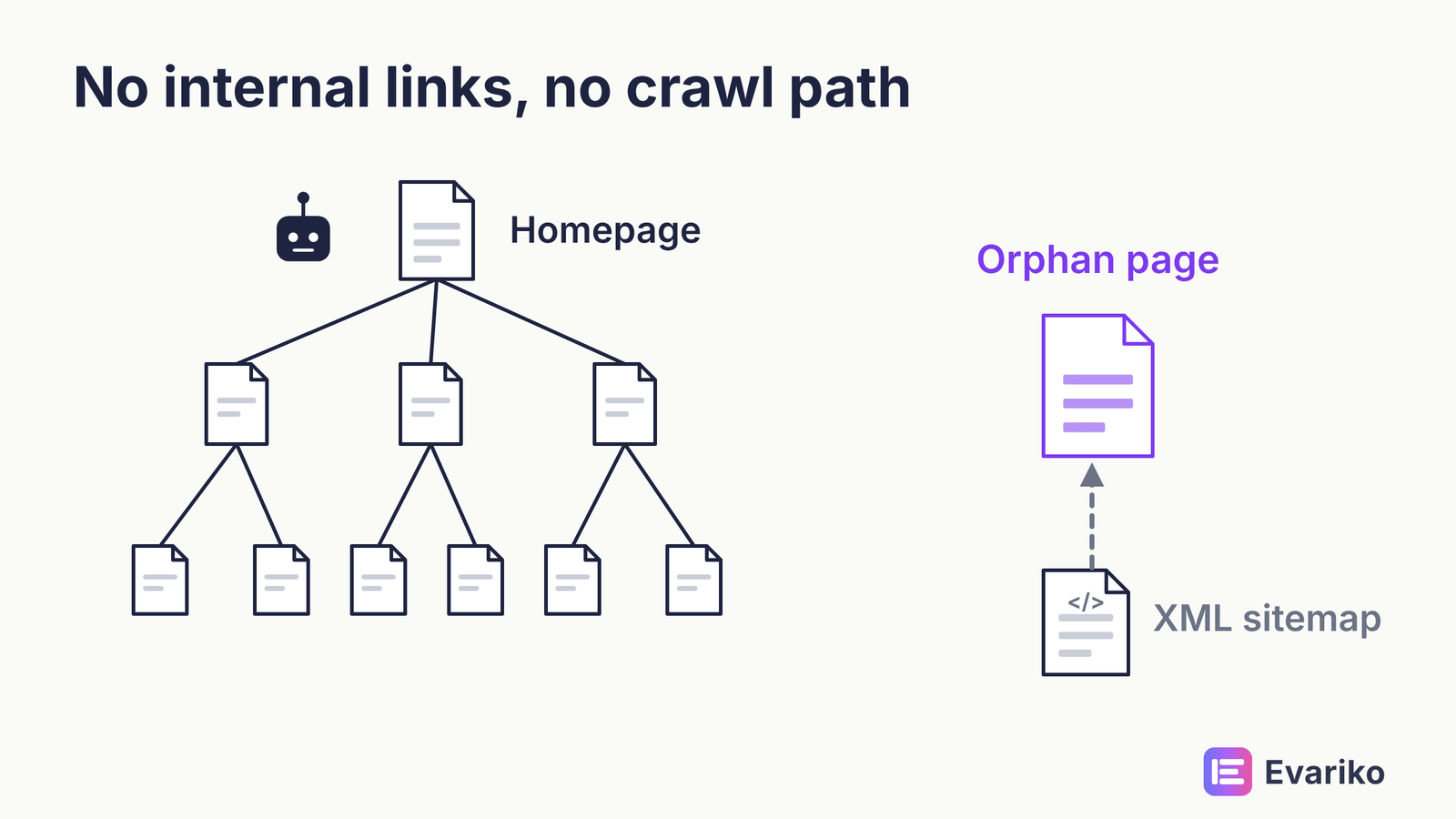
Discovery comes first. Googlebot finds new URLs by following links from pages it already knows, by reading XML sitemaps, and by following redirects. A page with no internal links pointing to it is an orphan page. Googlebot finds orphan pages only through the sitemap, if at all.
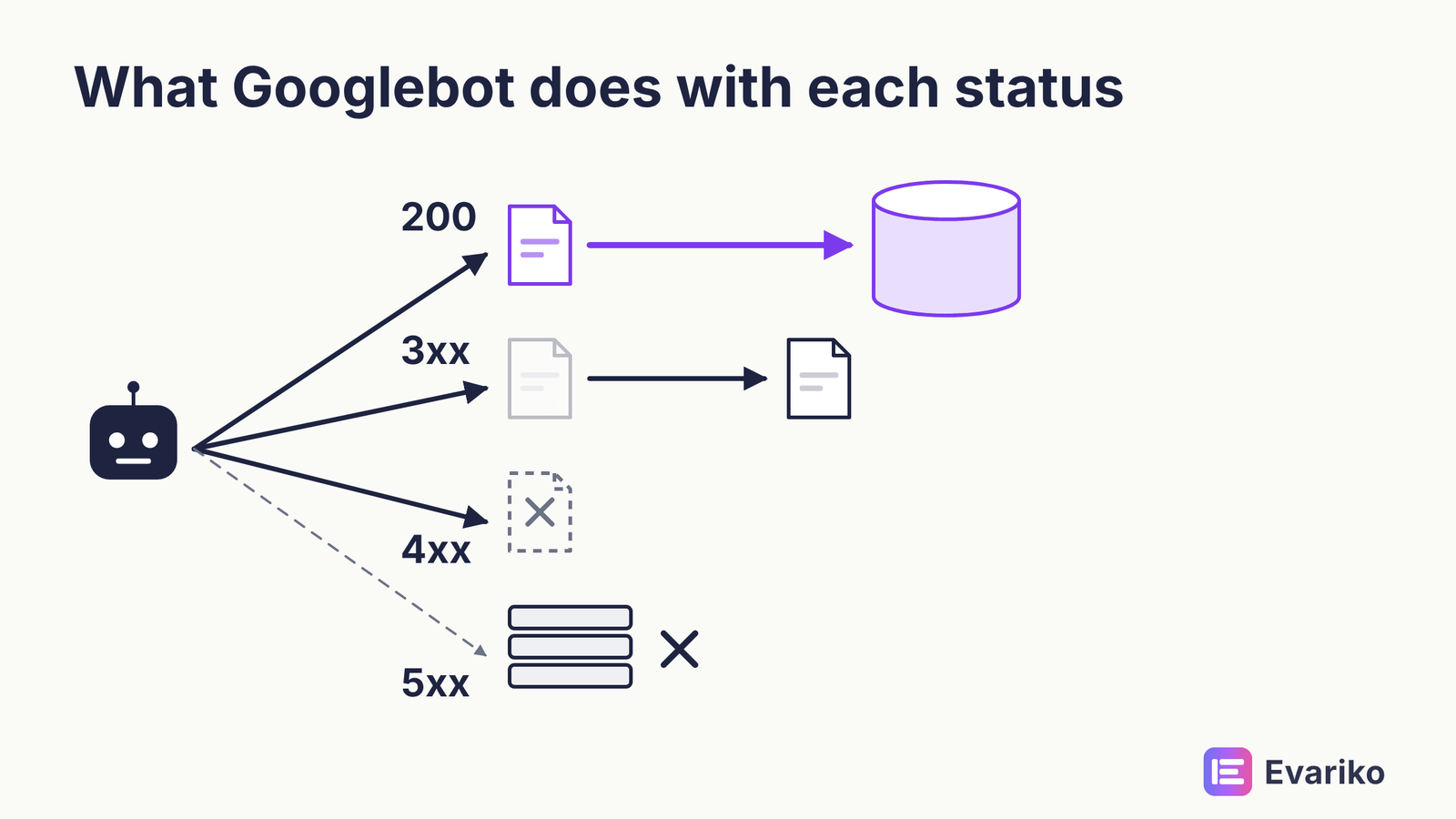
Crawling comes next. Googlebot checks robots.txt, requests the URL, and reads the server response. A 200 status code lets the page continue. A 3xx status code sends Googlebot to another URL, a 4xx status code tells Googlebot the page is missing, and a 5xx status code tells Googlebot your server failed. Repeated 5xx errors make Googlebot slow its crawling of your site.
What should and should not be in robots.txt?
Robots.txt should block crawling of URLs that have no search value, and it should never block pages you want indexed or the resources those pages need to render. The robots.txt file sits at the root of your domain and gives crawlers rules by user agent. Typical blocked paths are internal search results, cart and checkout pages, and parameter URLs that generate endless variations.
Two rules matter more than the rest. First, robots.txt controls crawling, not indexing. A blocked URL can still appear in results if other pages link to that URL, because Google knows the URL exists without reading its content.
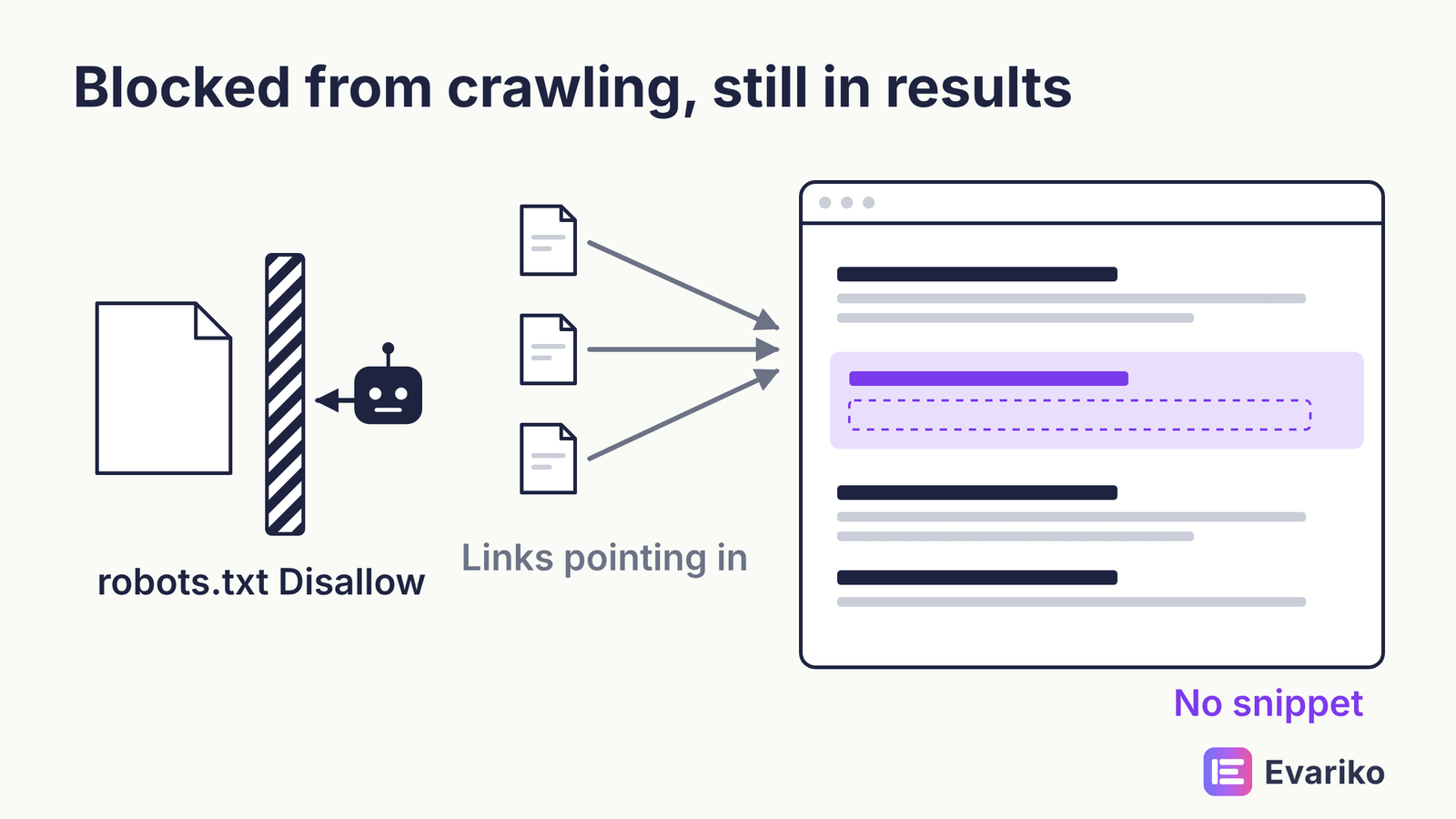
To keep a page out of the index, use a noindex directive and leave the page crawlable so Google can read that directive. Second, do not block CSS or JavaScript files that a page needs to render. Google renders pages, and a blocked script is a blocked layout.
Google retired its old robots.txt testing tool. Search Console now has a robots.txt report under Settings, which shows the robots.txt files Google found, when Google last fetched each file, and any errors. The full rule set, including how directives conflict, is in the robots.txt guide.
What belongs in an XML sitemap?
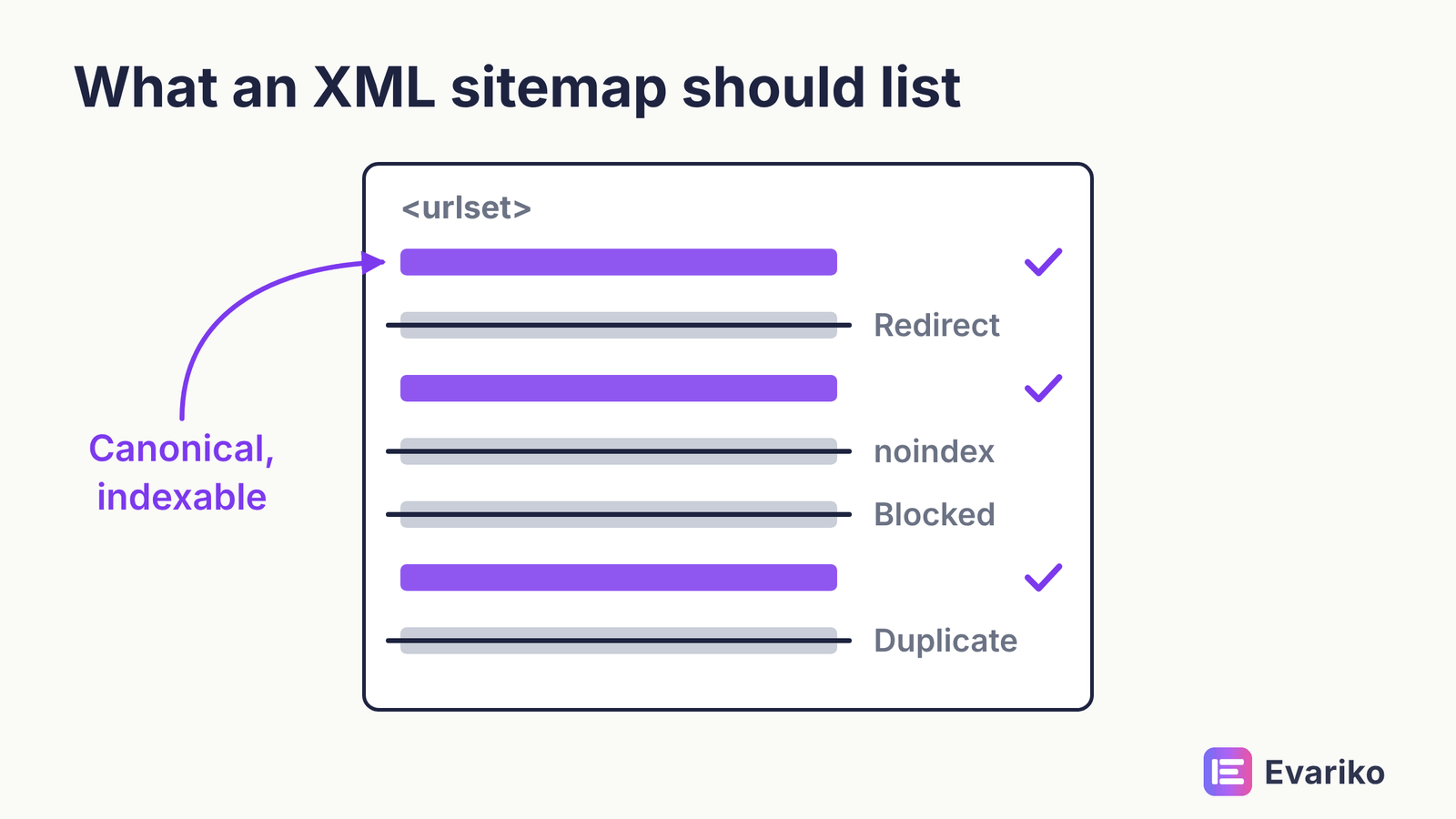
An XML sitemap should list every canonical, indexable URL you want in search results, and nothing else. That means no redirected URLs, no URLs carrying a noindex directive, no URLs blocked by robots.txt, and no non-canonical duplicates. A sitemap full of URLs you do not want indexed sends Google mixed signals and wastes the file’s value as a discovery aid.
Submit the sitemap in Search Console and reference it in robots.txt. Large sites split sitemaps by section, which makes the Page Indexing report easier to read per section. Split rules and file limits are in the guide to XML sitemaps.
How should a site be structured so crawlers reach the important pages?
A site should place its most important pages close to the homepage and connect every page through contextual internal links, so crawlers reach important pages in few steps. Site architecture is the hierarchy of sections and pages. Internal linking is the set of links that carries crawlers and visitors through that hierarchy. The two work together: architecture decides where a page sits, and internal links decide whether crawlers can follow the path to that page.
Pages linked from the homepage and from many internal pages are crawled more often. Pages buried several clicks deep, or reachable only through pagination, are crawled less.

The design rules for depth and crawl paths are in the site architecture guide, and anchor text and link distribution are in the guide to internal linking.
Does crawl budget apply to your site?
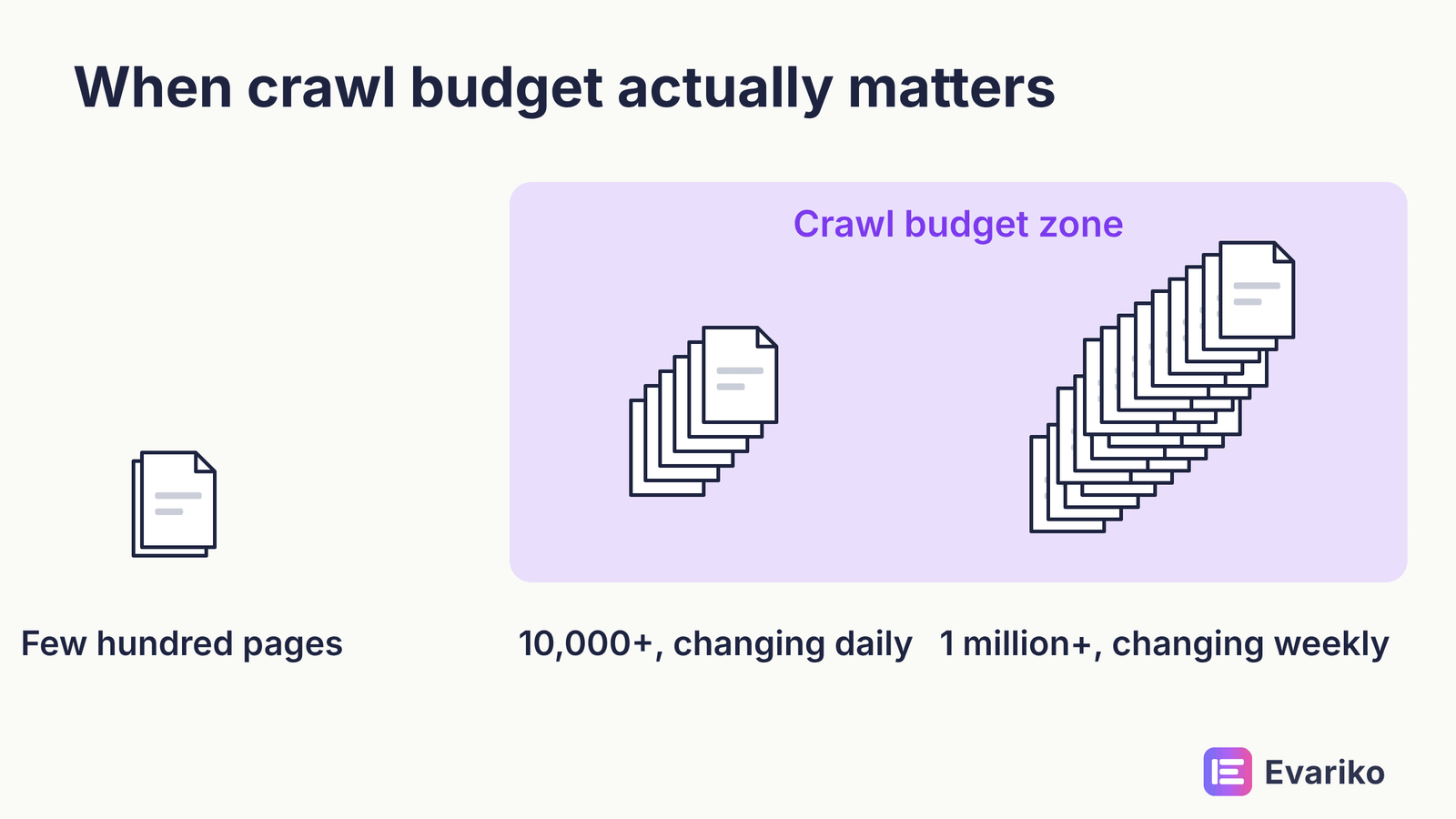
Crawl budget applies mainly to large or fast-changing sites. Google’s crawl budget guide addresses sites with more than about one million unique pages that change weekly, sites with more than about 10,000 pages that change daily, and sites with many URLs marked “Discovered – currently not indexed” in Search Console. Google calls those figures rough estimates. For smaller sites, Google says that keeping the sitemap current and checking the Page Indexing report is enough. If your site has a few hundred pages, crawl budget optimization is not your problem.
If you are past those thresholds, the crawl budget guide covers log reading and saving methods.
Why Can Google Not See Content That Is Visibly on the Page?
Google cannot see content that is visibly on the page when that content is created by JavaScript that fails, times out, or depends on resources Google cannot fetch during rendering. Rendering is the stage where the engine runs a page’s code so it can see what a visitor sees. If the visitor’s browser builds the content and Google’s renderer does not, the content does not exist for indexing.
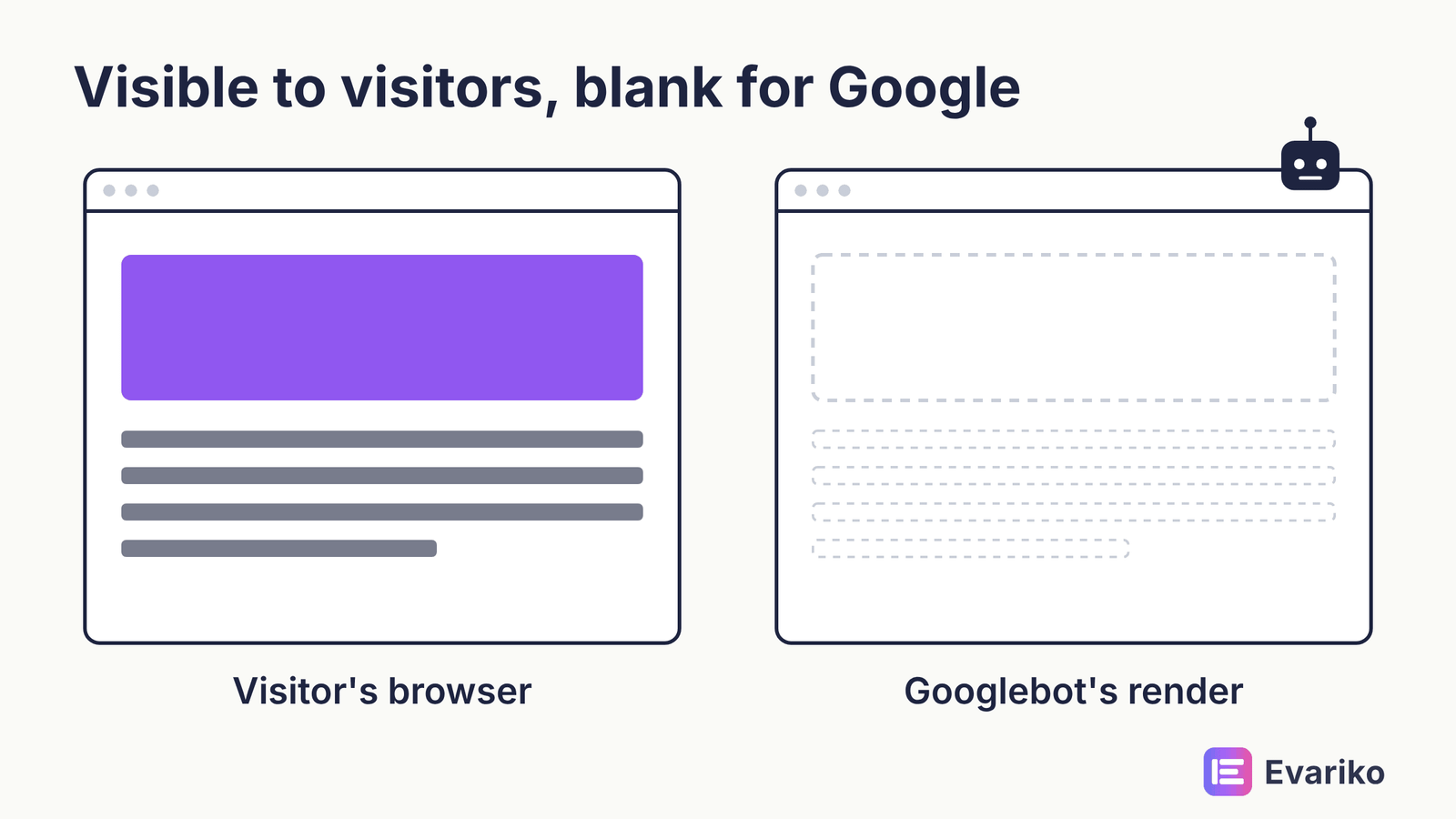
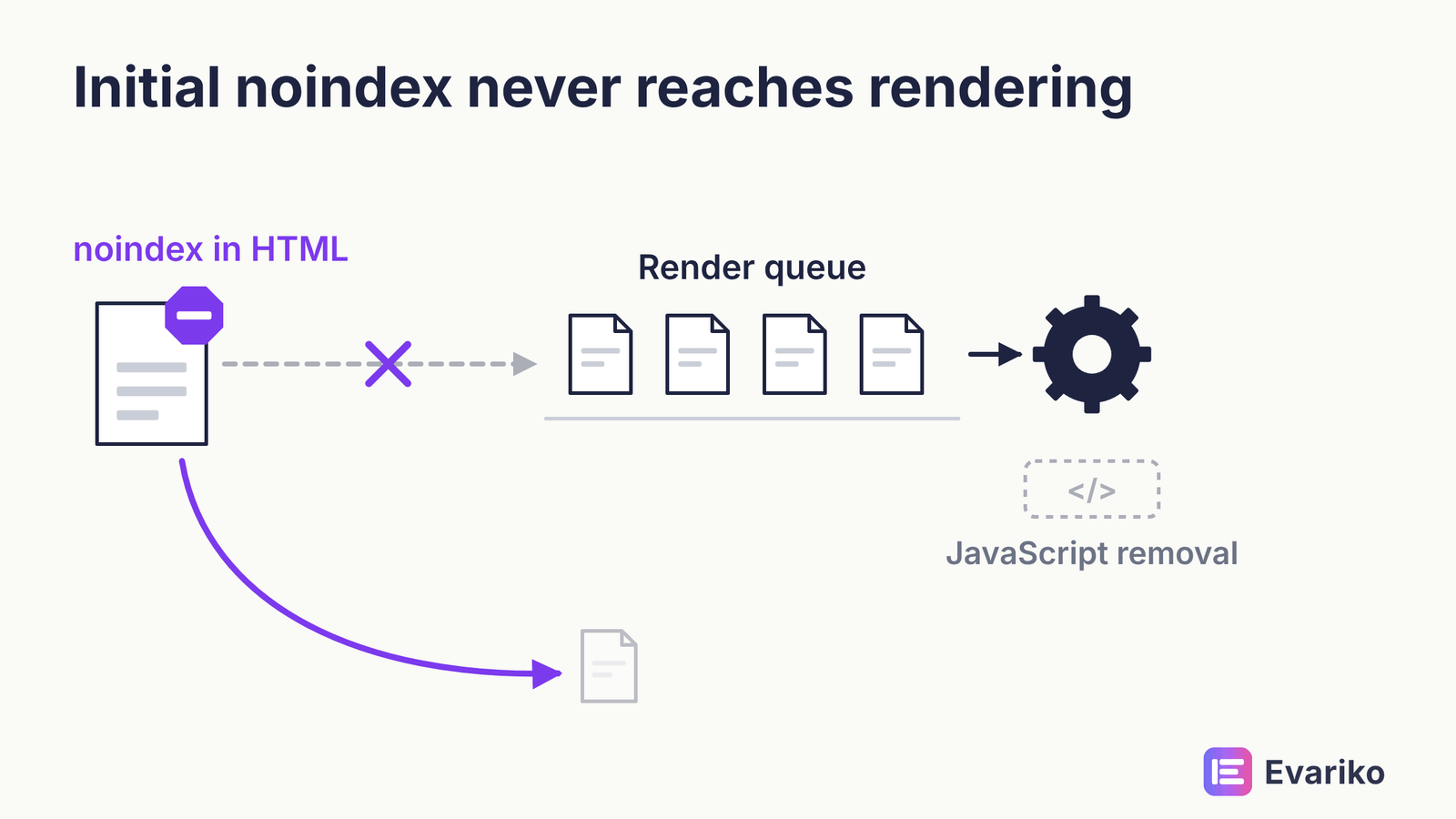
Google’s JavaScript documentation describes the process. Googlebot crawls the URL and reads the initial HTML. Googlebot then queues every page that returns a 200 status code for rendering, and a headless version of Chromium runs the page’s JavaScript when resources allow. The wait in that queue can be seconds or longer. Google indexes the rendered HTML and reads the rendered HTML again for new links.
One detail catches many sites. A noindex directive in the initial HTML keeps the page out of the rendering queue. If your JavaScript removes that directive after load, Google never sees the removal.
What is the difference between client-side and server-side rendering?
Client-side rendering builds the page in the visitor’s browser with JavaScript; server-side rendering sends a page whose HTML already contains the content. With client-side rendering, the initial HTML is often a near-empty shell, and everything depends on the rendering stage succeeding. With server-side rendering or pre-rendering, the content and links exist before any script runs.
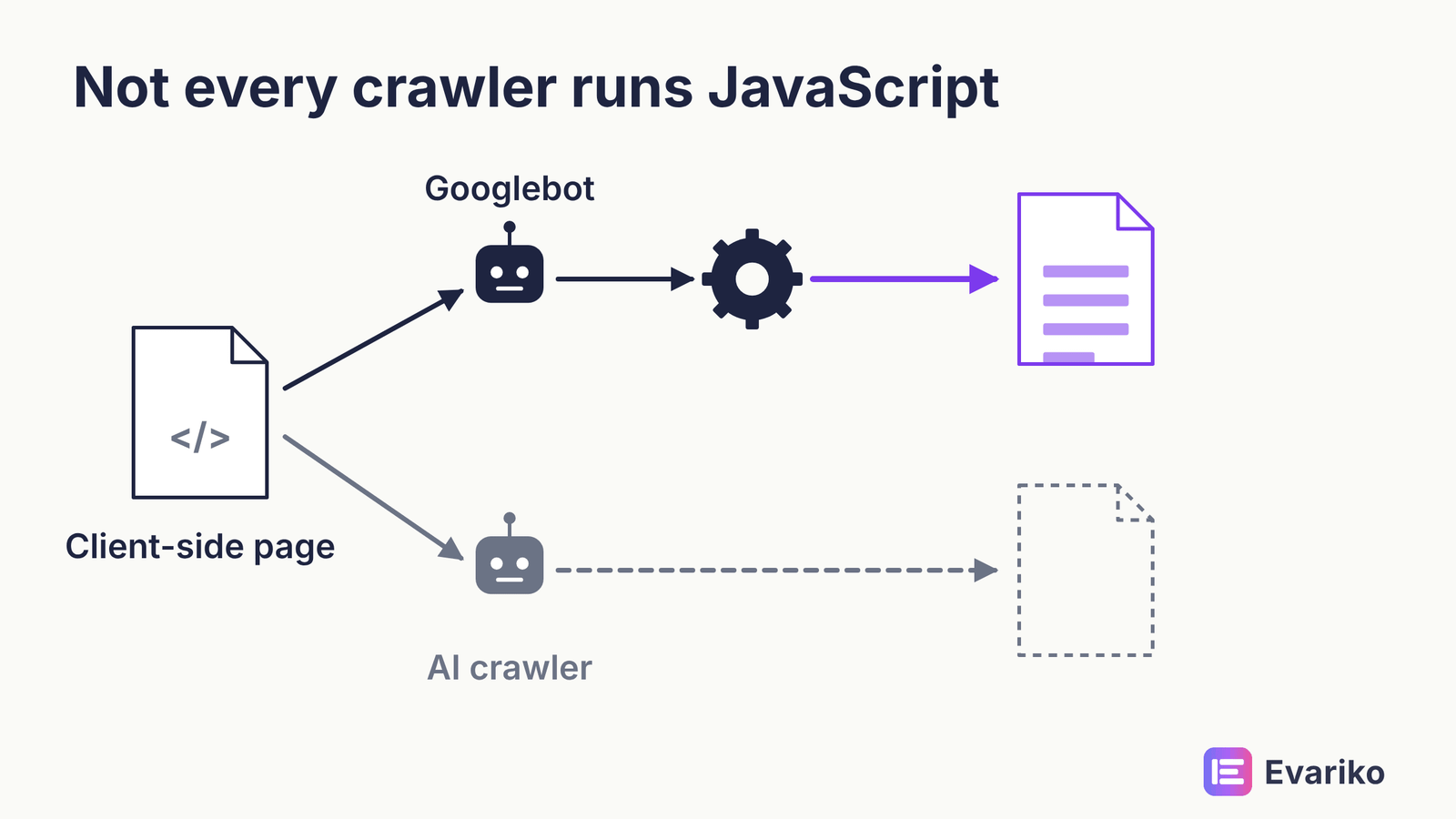
Google’s documentation recommends server-side rendering or pre-rendering, because it makes pages faster for users and crawlers and because not every bot runs JavaScript. That last point matters more each year: several AI crawlers do not render JavaScript the way Googlebot does.
Dynamic rendering, which serves a pre-rendered version to bots only, is described in Google’s documentation as a workaround rather than a long-term solution.
To check rendering, use the URL Inspection tool in Search Console, run a live test, and view the rendered HTML. If your main content or your menu links are missing from that rendered HTML, the page has a rendering problem. Frameworks, hydration and the parts of a page Google misses are in the JavaScript SEO guide, and decoupled builds are covered in the guide to headless CMS rendering choices.
Rendering is also where a site’s build decides its technical SEO before any audit happens. Evariko builds websites as well as running SEO, so rendering method is set at the build stage rather than retrofitted after launch. Server-rendered content from day one is the cheapest rendering fix there is, and the website build service starts from that rule.
Why Is a Crawled Page Not Indexed?
A crawled page is not indexed when a directive excludes it, when Google judges it a duplicate and chooses another URL as canonical, when the page returns an error, or when Google decides the page does not add enough value to store. Indexability is the condition of a page being storable in the index. Search Console’s Page Indexing report lists the reason for every excluded URL it knows about.
Two statuses confuse most site owners. “Discovered – currently not indexed” means Google knows the URL and has not crawled it yet. On small sites this usually points to weak internal linking or low perceived value. “Crawled – currently not indexed” means Google fetched the page and chose not to store it. That points to quality or duplication, not to access.

Twelve causes and their fixes are in the guide to why pages are not indexed.
Why did Google pick a different URL than the one you wanted?
Google picks a different canonical URL when the signals on your site disagree with your canonical tag. A canonical tag is an HTML element that tells search engines which URL is the preferred version of a page. Google treats the canonical tag as a strong hint, not a command. Redirects, internal links, sitemap entries and HTTPS status all act as further canonical signals. When those signals point at a different URL than the tag does, Google often follows the signals.
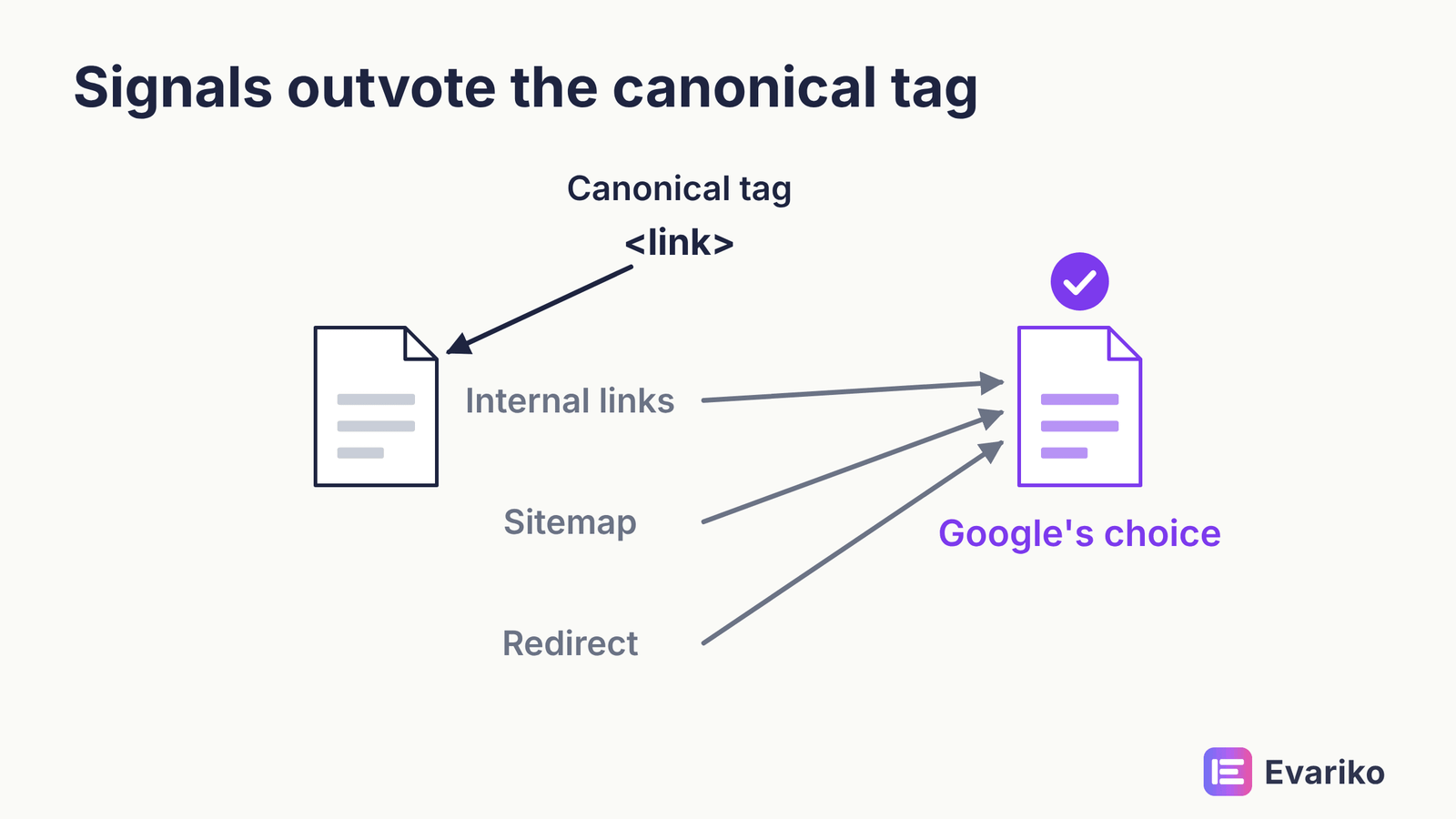
Duplicate content is the cause most of the time. The same page can exist at several URLs: with and without a trailing slash, with tracking parameters, on HTTP and HTTPS, or under two category paths. Duplicate content is not a penalty. Google groups the duplicates, selects one canonical, and shows that canonical. The risk is that Google selects the wrong one. Align every signal (canonical tag, internal links, sitemap, redirects) on the same URL. Self-referencing rules and conflicts are in the canonical tags guide, when to act on duplication is in the guide to duplicate content, and redirects have their own guide covering 301 against 302 and redirect chains.
What does mobile-first indexing mean for your site?
Mobile-first indexing means Google uses the mobile version of your page for indexing and ranking. Google completed the move to mobile-first indexing on 5 July 2024. Sites whose content is not accessible on mobile devices became liable to removal from the index after that date.
The practical check is parity. The mobile version must carry the same main content, the same headings, the same structured data, the same internal links and the same meta directives as the desktop version. Content hidden on mobile behind a missing component is content Google does not index.
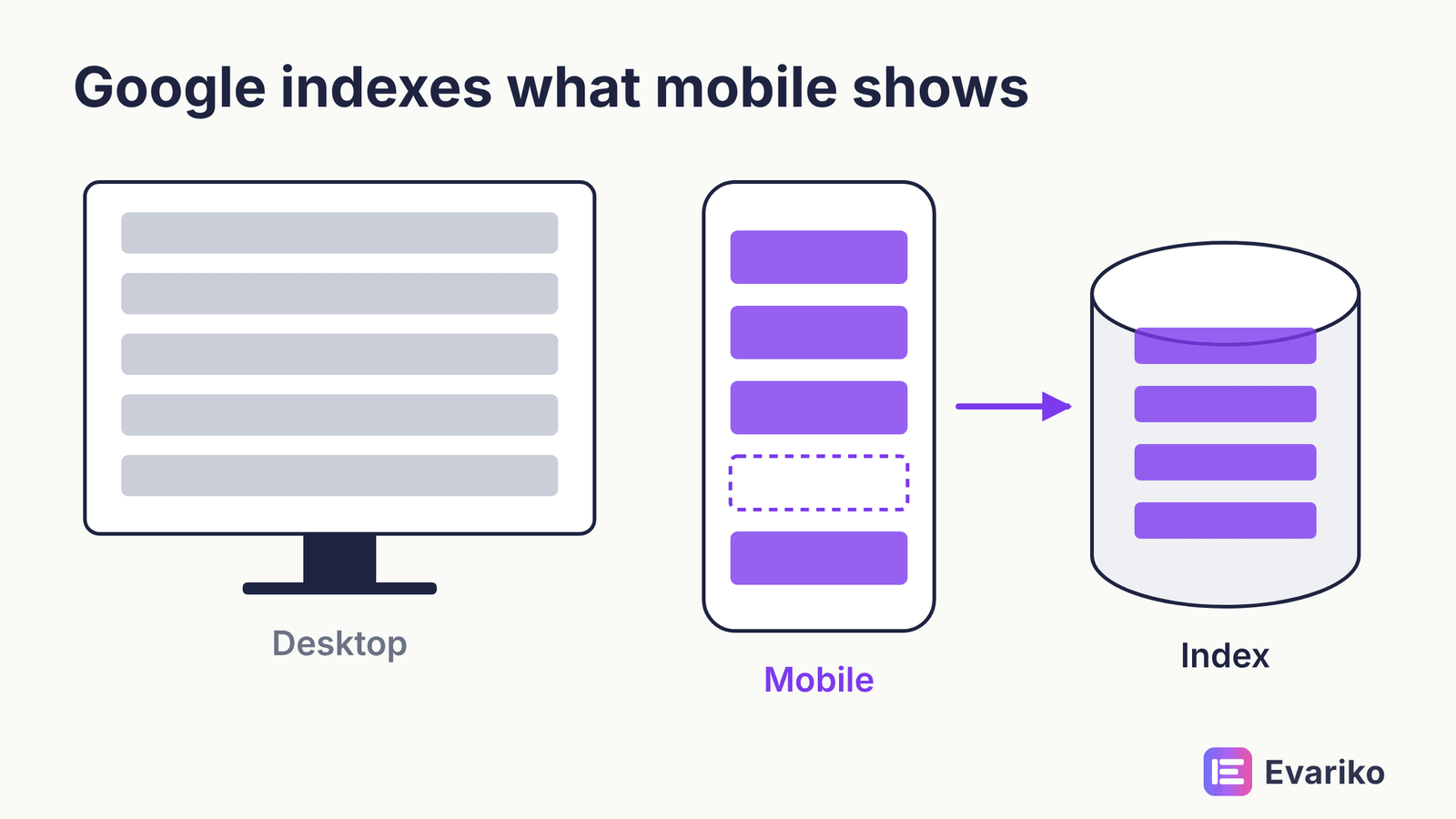
Parity checks and frequent failures are in the mobile-first indexing guide.
What Decides How an Indexed Page Is Served?
Once a page is indexed, Google serves the page according to relevance first and quality signals second, with page experience, structured data and HTTPS acting at the margin. This is the only stage where position changes, and it is the stage most technical budgets reach too early.
What are Core Web Vitals and why do they matter?
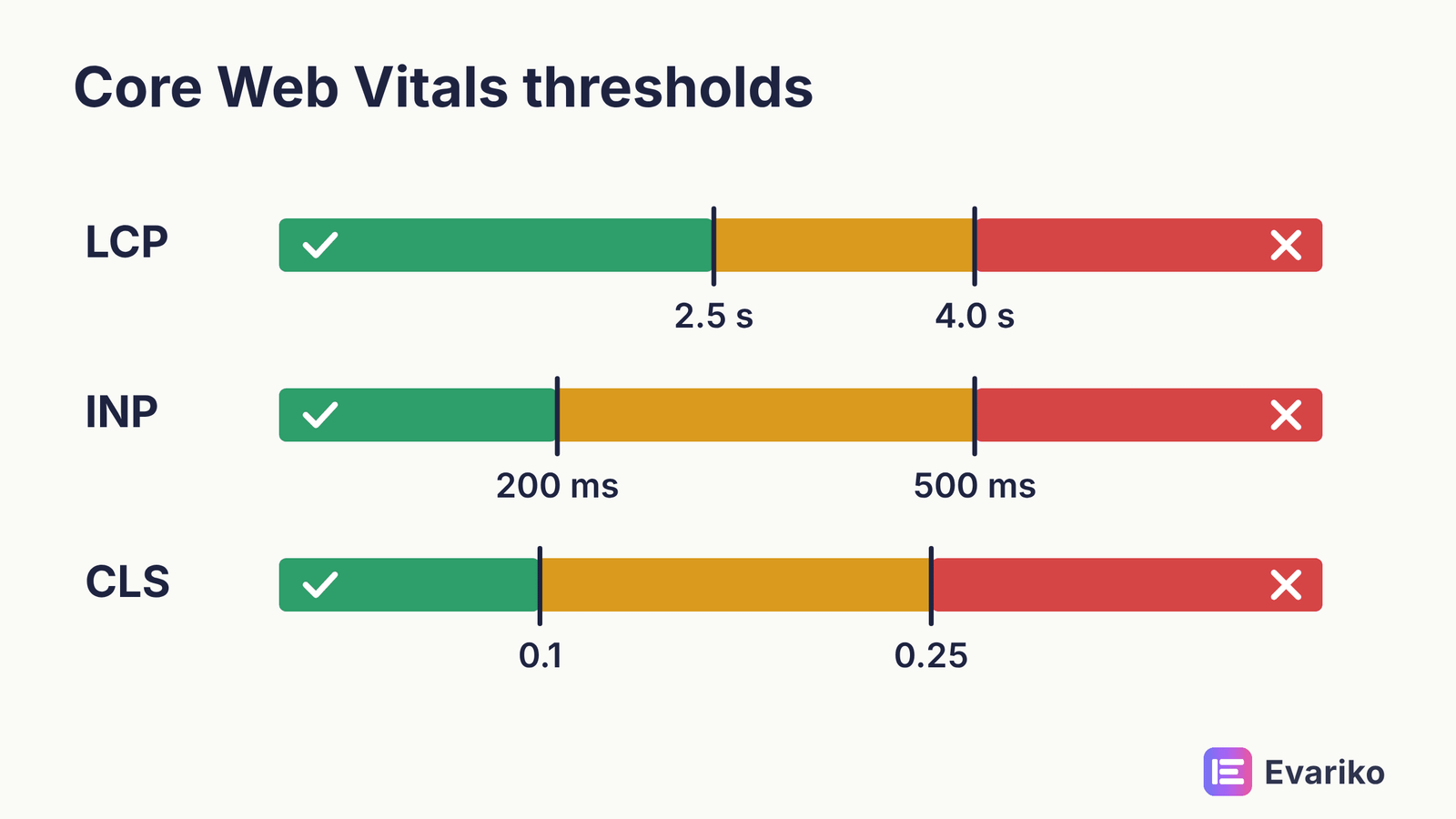
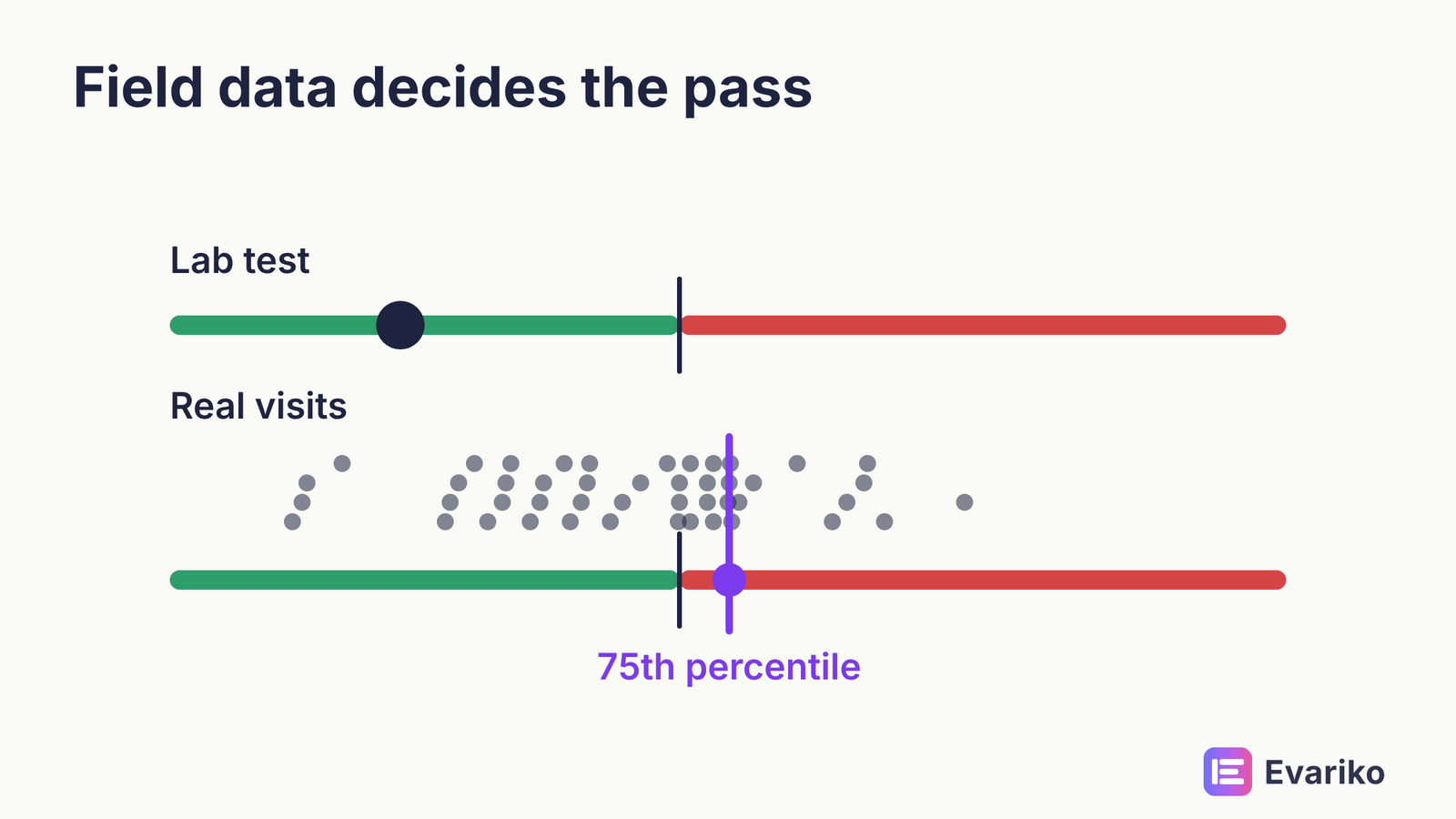
Core Web Vitals are three Google metrics that measure loading, responsiveness and visual stability, assessed on real-user field data at the 75th percentile of page views. They matter because Google’s ranking systems use them, and because they measure what visitors experience. They do not outweigh relevance.
The three metrics have different units. LCP and INP are times. CLS is a unitless score.
| Metric | Measures | Good | Needs improvement | Poor |
|---|---|---|---|---|
| Largest Contentful Paint (LCP) | Loading: time until the largest visible element renders | 2.5 seconds or less | 2.5 to 4.0 seconds | Over 4.0 seconds |
| Interaction to Next Paint (INP) | Responsiveness: delay between an interaction and the next frame | 200 milliseconds or less | 200 to 500 milliseconds | Over 500 milliseconds |
| Cumulative Layout Shift (CLS) | Visual stability: unexpected layout movement | 0.1 or less (no unit) | 0.1 to 0.25 | Over 0.25 |
A page passes a metric when at least 75% of its page views meet the “good” threshold. The same thresholds apply to mobile and desktop. Lab tools such as Lighthouse show you why a page is slow; field data from the Chrome UX Report decides whether the page passes. A green Lighthouse score with failing field data is still a failing page.
What replaced FID in Core Web Vitals?
Interaction to Next Paint (INP) replaced First Input Delay (FID) as the Core Web Vitals responsiveness metric on 12 March 2024. FID measured only the delay before the first interaction was processed. INP measures the responsiveness of interactions across the whole visit.
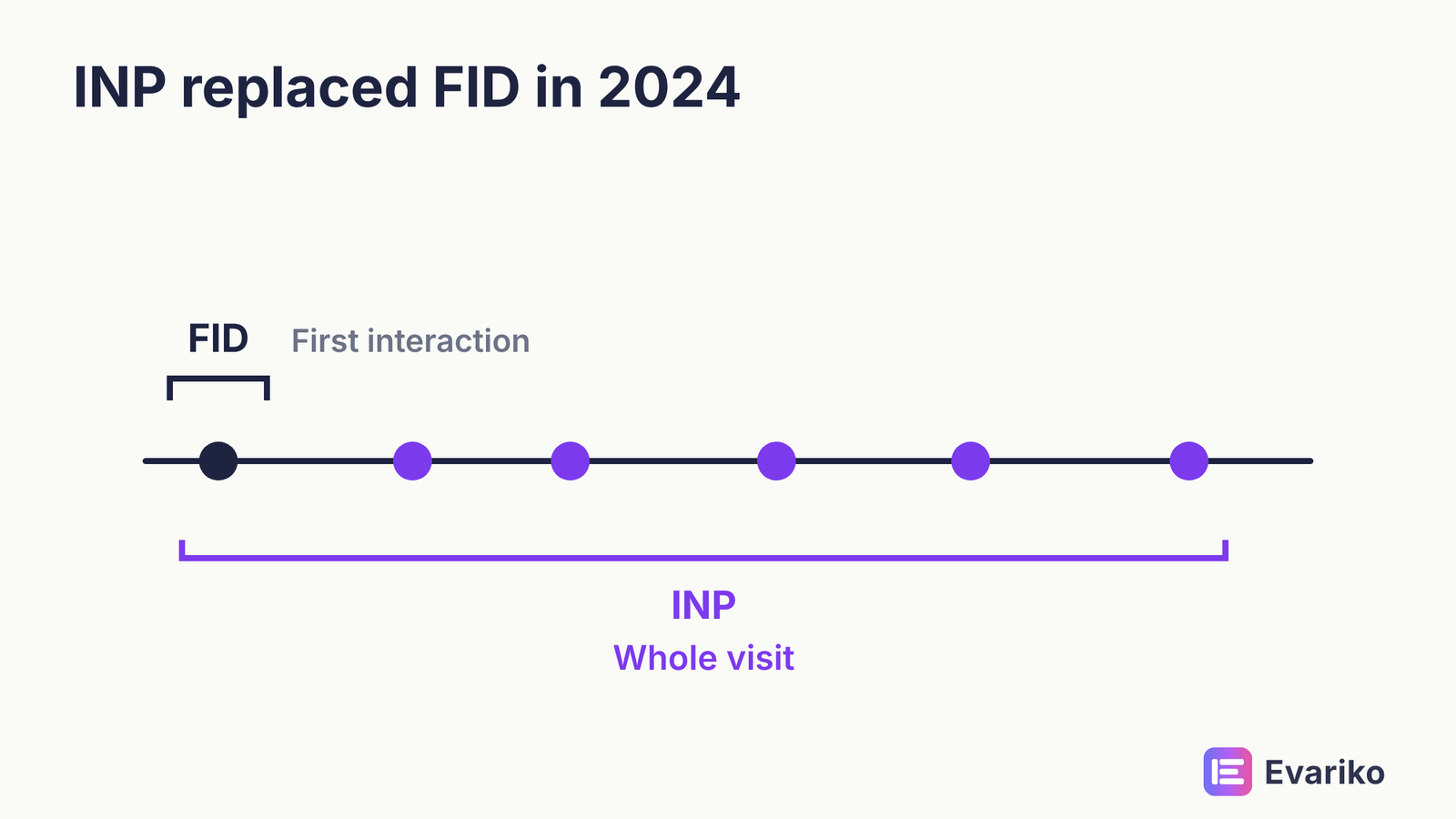
Fixes and thresholds by metric are in the Core Web Vitals guide.
What actually makes a page load faster?
A page loads faster when it sends less code, sends the largest visible element sooner, and makes the browser wait less for the server. Page speed optimization usually comes down to a short list: compress and correctly size images, serve modern image formats, remove unused JavaScript and CSS, defer non-critical scripts, cache at the server and the CDN, and reduce server response time. Most speed problems on small sites come from heavy themes, too many plugins and uncompressed images, not from hosting. What moves load time on real sites, ranked by effect, is in the site speed guide.
What does schema markup actually do?
Schema markup is structured data that labels the entities and facts on a page in a format search engines read directly, and it makes a page eligible for rich results. Structured data uses the Schema.org vocabulary, usually written in JSON-LD. Common types include Organization, LocalBusiness, Product, Article, BreadcrumbList and FAQPage.
Google presents structured data as a way to understand content and qualify for rich results, not as a ranking boost. Eligibility is not a guarantee: Google decides whether a rich result appears. Test markup with Google’s Rich Results Test, which shows which rich result types a page supports, and check Schema.org validity with the Schema Markup Validator. Which types still earn results, and how to test them, is in the guide to structured data.
Does HTTPS affect rankings?
HTTPS is a confirmed but lightweight ranking signal, and its larger value is trust and security. HTTPS encrypts the connection between visitor and server. Browsers mark HTTP pages as not secure, which costs you visitors before rankings come into it. Google indexes HTTP pages routinely, so HTTPS is not an indexing gate. The common technical problems are mixed content (HTTP resources on an HTTPS page), expired certificates, and HTTP URLs left in internal links and sitemaps after a move. Free certificates from Let’s Encrypt cover most sites. Certificate and mixed content fixes are in the guide to HTTPS and mixed content.
How Does Technical SEO Affect AI Overviews and AI Search?
AI search draws on the same technical foundation as classic search: Google’s AI features use Google’s index, so a page must pass every pipeline gate before an AI Overview can cite the page. The AI layer is not a separate pipeline. It is the serving stage with an extra surface, plus a second set of crawlers that make their own access decisions.
Do AI Overviews need special technical optimisation?
No. Google states there are no additional requirements to appear in AI Overviews or AI Mode beyond being indexed and eligible to show with a snippet. Google’s AI features documentation (last updated 10 December 2025) names that as the only technical requirement for a supporting link. The controls are the ones you already have: nosnippet, data-nosnippet, max-snippet and noindex.
That has a direct consequence. Every gate in this guide is also a gate for AI Overviews. A page excluded by a stray canonical is excluded from the AI Overview too.

A snippet restriction set years ago for a different reason limits what AI features can quote today.
Which AI crawlers visit your site, and should you block them?
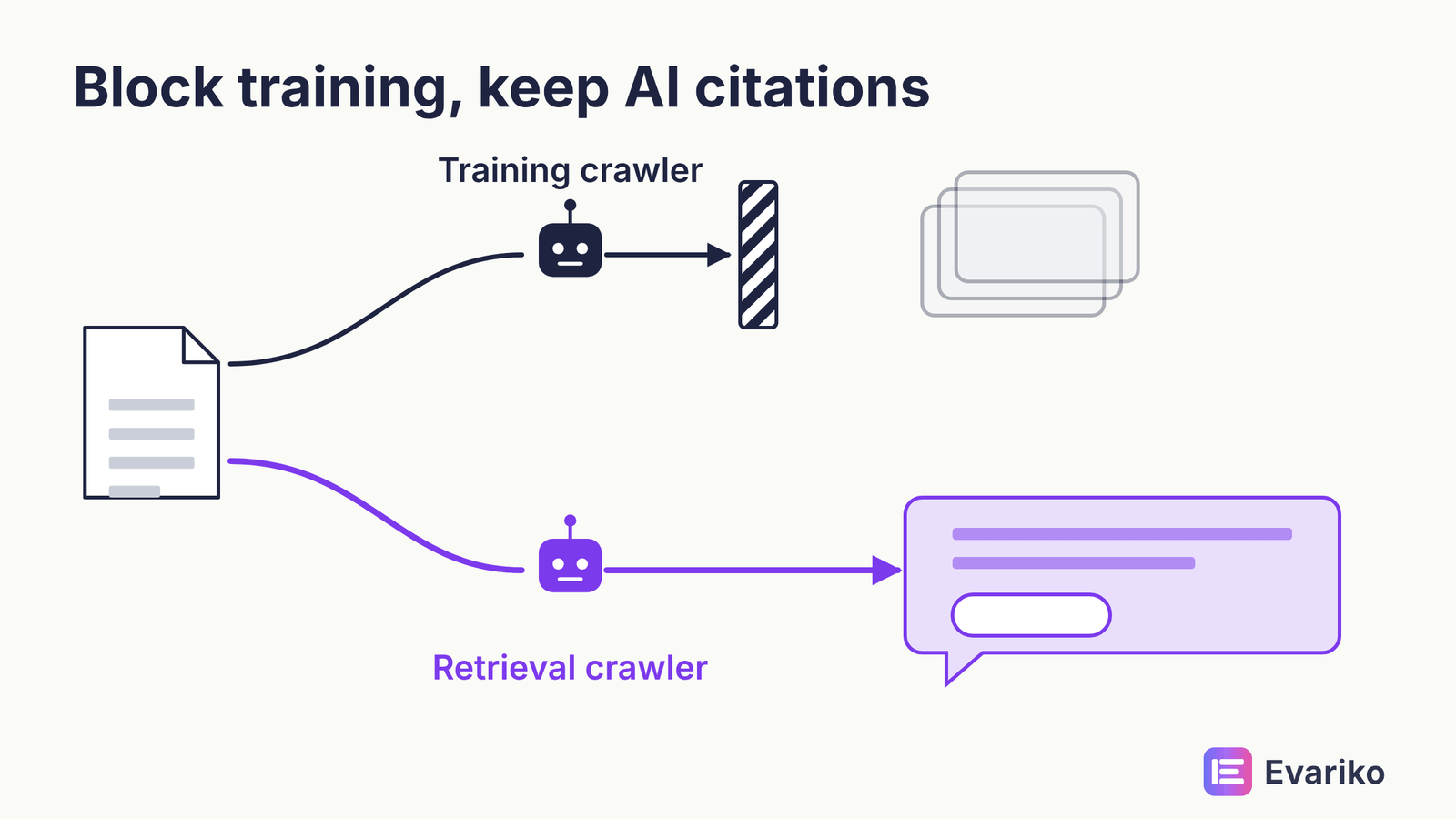
AI crawlers fall into two groups, training crawlers and retrieval crawlers, and robots.txt lets you treat the two groups differently. Training crawlers collect content that may train future models. Retrieval crawlers fetch pages so an AI search product can find, cite and link them. Blocking a training crawler does not remove you from that vendor’s search product. Blocking a retrieval crawler does.
| Vendor | Training | Search and retrieval | User-initiated fetch |
|---|---|---|---|
| OpenAI | GPTBot | OAI-SearchBot (ChatGPT search) | ChatGPT-User (robots.txt rules may not apply) |
| Anthropic | ClaudeBot | Claude-SearchBot | Claude-User |
| Perplexity | Not used for training, per Perplexity | PerplexityBot | Perplexity-User (generally ignores robots.txt) |
| Google-Extended (Gemini training and grounding) | Googlebot (Search, including AI Overviews) | n/a |
Google-Extended deserves a careful line. Google states that Google-Extended “does not impact a site’s inclusion in Google Search nor is it used as a ranking signal.” Blocking Google-Extended does not remove you from AI Overviews. Blocking Googlebot does, along with everything else in Google Search.
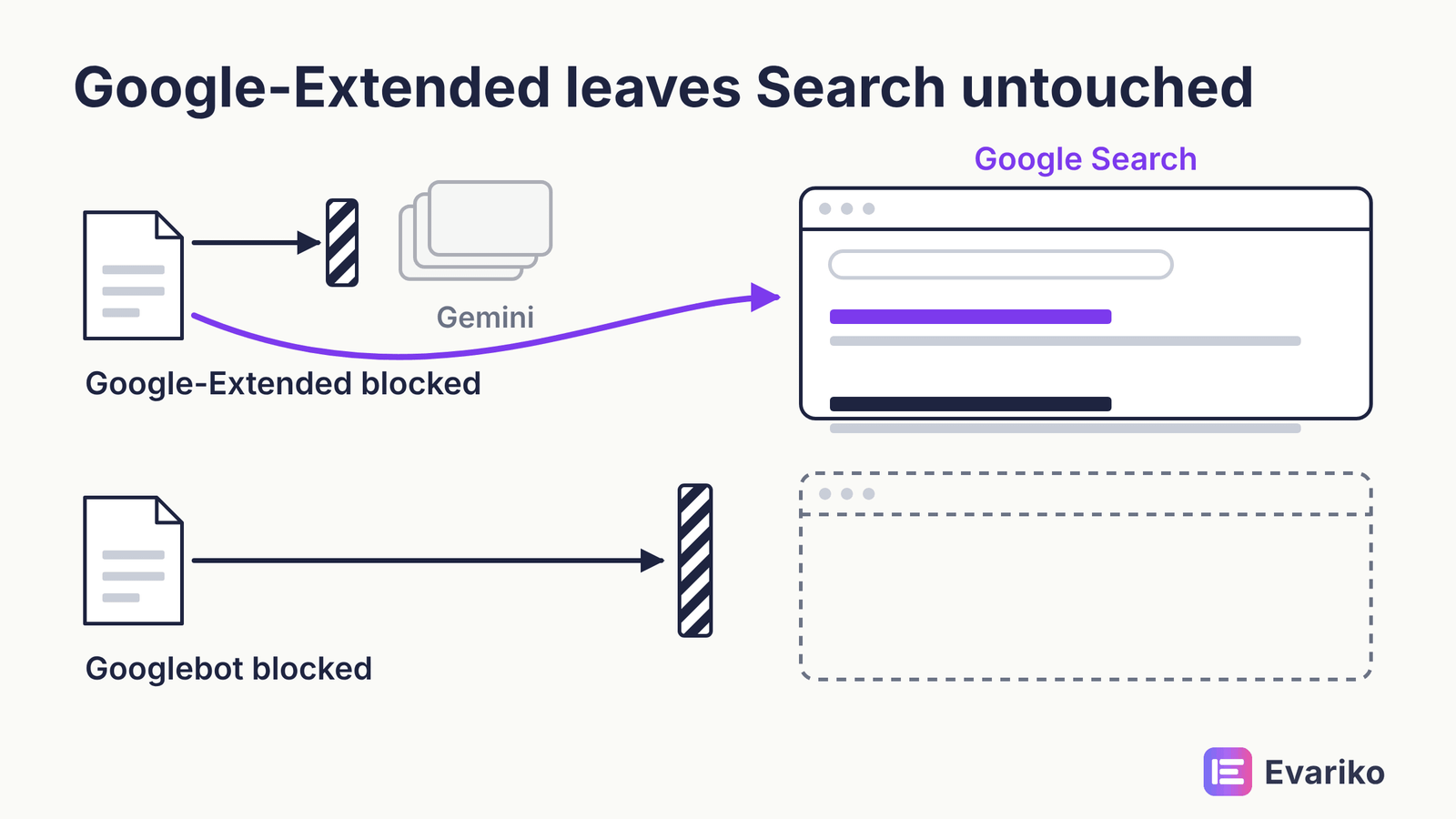
The decision is commercial, not technical. If you want citations in ChatGPT search, Claude and Perplexity, allow OAI-SearchBot, Claude-SearchBot and PerplexityBot. Whether you also allow GPTBot, ClaudeBot and Google-Extended is a separate question about training use. Each bot, and whether to block it, is covered in the guide to AI crawlers, and the split decision is in the guide to controlling AI training access. One more technical point: several AI crawlers do not run JavaScript the way Googlebot does, which makes server-rendered content a visibility requirement for AI search as well.
What is llms.txt?
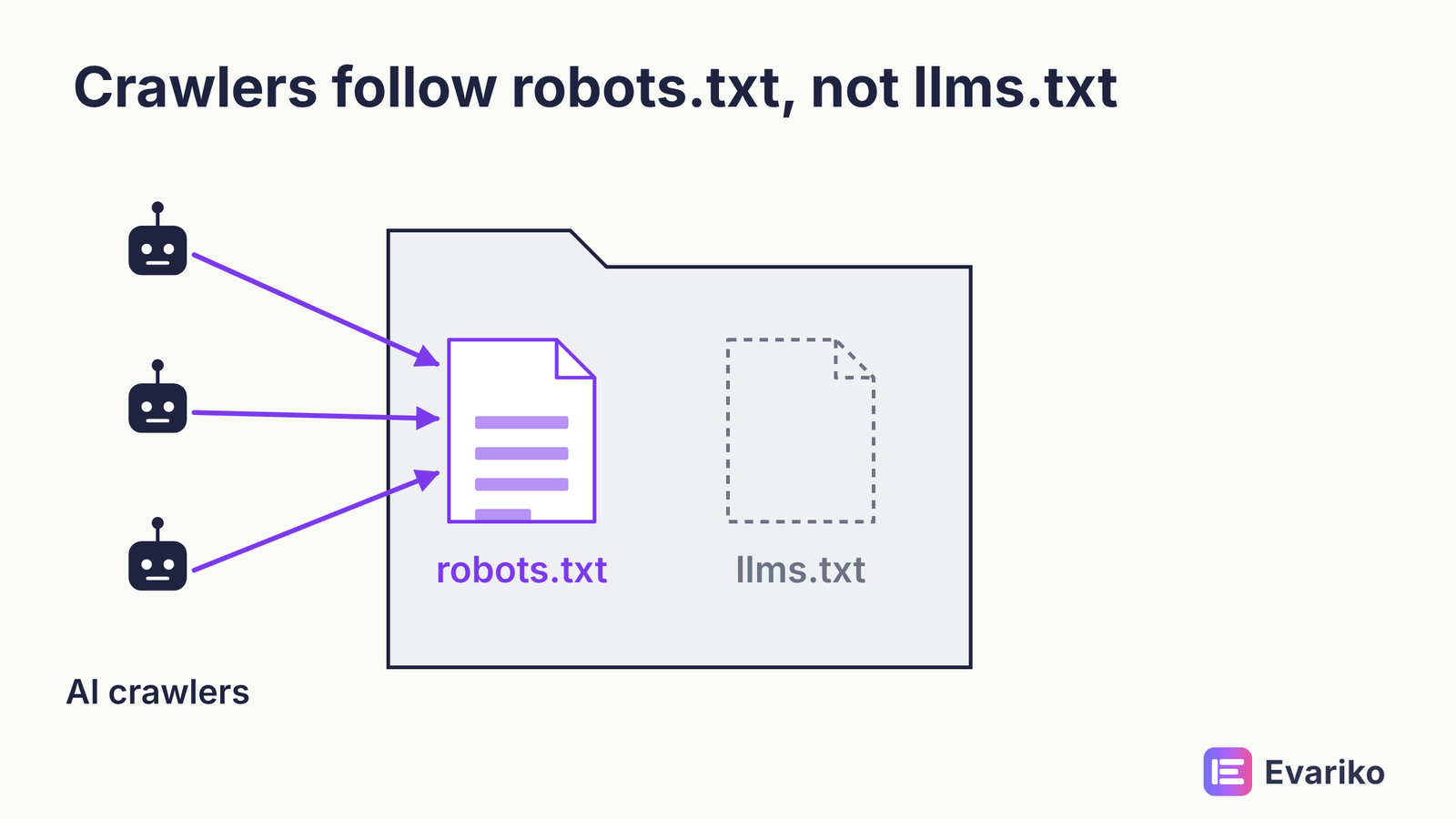
llms.txt is a proposed file format that lists a site’s key content for language models; no major AI vendor has confirmed it as a crawl-control or ranking mechanism. In June 2025, Google’s John Mueller wrote that “no AI system currently uses llms.txt.” Publishing the file costs little. Treating the file as a robots.txt for AI is wrong, because robots.txt user-agent rules are what the vendors above document and honour.
The structural work that helps AI citation (clear answers, named entities, extractable formats) sits in answer engine optimisation and generative engine optimisation. Technical SEO’s job is to make sure that work reaches the index and the retrieval crawlers.
How Do You Find Out Where Your Page Is Stuck?
You find where a page is stuck by inspecting the URL in Search Console, reading which stage the page failed at, and checking the cause for that stage. The URL Inspection tool reports whether the URL is on Google, whether crawling was allowed, the last crawl, the user-declared canonical, the Google-selected canonical, and the rendered HTML. Those fields map directly onto the pipeline.
Use the table below from the top. Stop at the first row that matches your symptom.
| Symptom | Stage it points to | Where to check | What the result means | First fix |
|---|---|---|---|---|
| URL Inspection says “URL is unknown to Google” | Discover | URL Inspection; sitemap; internal links | Google has never found the URL | Add internal links from crawled pages; list the URL in the sitemap |
| “Discovered – currently not indexed” | Discover to crawl | Page Indexing report | Google knows the URL and has not fetched it | Strengthen internal links; check server capacity on large sites |
| “Blocked by robots.txt” | Crawl | robots.txt report; URL Inspection | A Disallow rule matches the URL | Remove or narrow the rule |
| Server error (5xx) or timeout | Crawl | Page Indexing report; Crawl Stats report | Your server failed Googlebot’s request | Fix hosting, server errors or firewall rules |
| Indexed, but content or links missing from rendered HTML | Render | URL Inspection live test, rendered HTML | JavaScript did not produce the content for Google | Server-render the main content and links; unblock scripts |
| “Excluded by ‘noindex’ tag” | Index | URL Inspection | A directive tells Google not to store the page | Remove the directive if the page should rank |
| “Duplicate, Google chose different canonical than user” | Index | URL Inspection, both canonical fields | Your signals disagree with your canonical tag | Align canonical tag, internal links, sitemap and redirects |
| “Crawled – currently not indexed” | Index | Page Indexing report | Google fetched the page and chose not to store it | Improve the page’s unique value, or merge it with a stronger page |
| Indexed, few impressions | Serve | Performance report | The page is eligible but not relevant for the queries | On-page relevance work, not technical work |
| Indexed, impressions but falling position | Serve | Performance report; Core Web Vitals report | Competing pages are judged more relevant or better | Content and quality first; page experience where tied |
The last two rows matter. Once a page is indexed, the problem is usually not technical, and the table tells you so instead of selling you a technical fix.
How do I fix crawl errors in Google Search Console?
You fix crawl errors in Google Search Console by opening the Page Indexing report, grouping excluded URLs by reason, fixing the cause for each group, and clicking Validate Fix. Start with groups that contain pages you want indexed. A 404 on a deleted page you meant to delete is not an error to fix. A 404 on a live product page is. After the fix, Search Console rechecks the affected URLs and reports whether the validation passed. Reading every report and setting priority are covered in the guide to crawl errors in Search Console.
What Does a Technical SEO Audit Include?
A technical SEO audit includes a full crawl of the site, a check of every pipeline stage against Search Console data, a ranked list of problems by pages affected and stages blocked, and a verification pass after fixes. A technical SEO audit is not a list of every warning a crawler tool produces. A good audit tells you which problems block which pages, in dependency order.
The technical SEO checklist below follows the pipeline. Work it top to bottom.
| Order | Check | Pass condition |
|---|---|---|
| 1 | Internal links and orphan pages | Every important page has internal links from crawled pages |
| 2 | XML sitemap | Lists only canonical, indexable, 200-status URLs; submitted in Search Console |
| 3 | robots.txt | Blocks no page or resource you want indexed or rendered |
| 4 | Status codes and redirects | Important pages return 200; redirects go in one hop |
| 5 | Rendering | Main content and links present in rendered HTML |
| 6 | Indexing directives | No unintended noindex in HTML or HTTP headers |
| 7 | Canonicals and duplicates | Google-selected canonical matches the declared canonical |
| 8 | Mobile parity | Mobile version carries the same content, links and markup |
| 9 | Core Web Vitals | Field data passes LCP, INP and CLS at the 75th percentile |
| 10 | Structured data | Valid in the Rich Results Test; matches visible content |
| 11 | HTTPS | No mixed content; valid certificate; HTTP redirects to HTTPS |
| 12 | AI crawler access | robots.txt rules for retrieval crawlers match your intent |
A broader SEO audit adds content and links to this list. Want a comprehensive technical SEO checklist that Evariko used for its client?
Here is our comprehensive 139 checks technical SEO checklists download it by visiting the link and enjoy.
How often should you run a technical SEO audit?
Run a full technical SEO audit when something changes the site’s structure or its traffic, and run a light monitoring check every month. A fixed number of audits per year ignores what actually breaks sites. Sites break when they change.
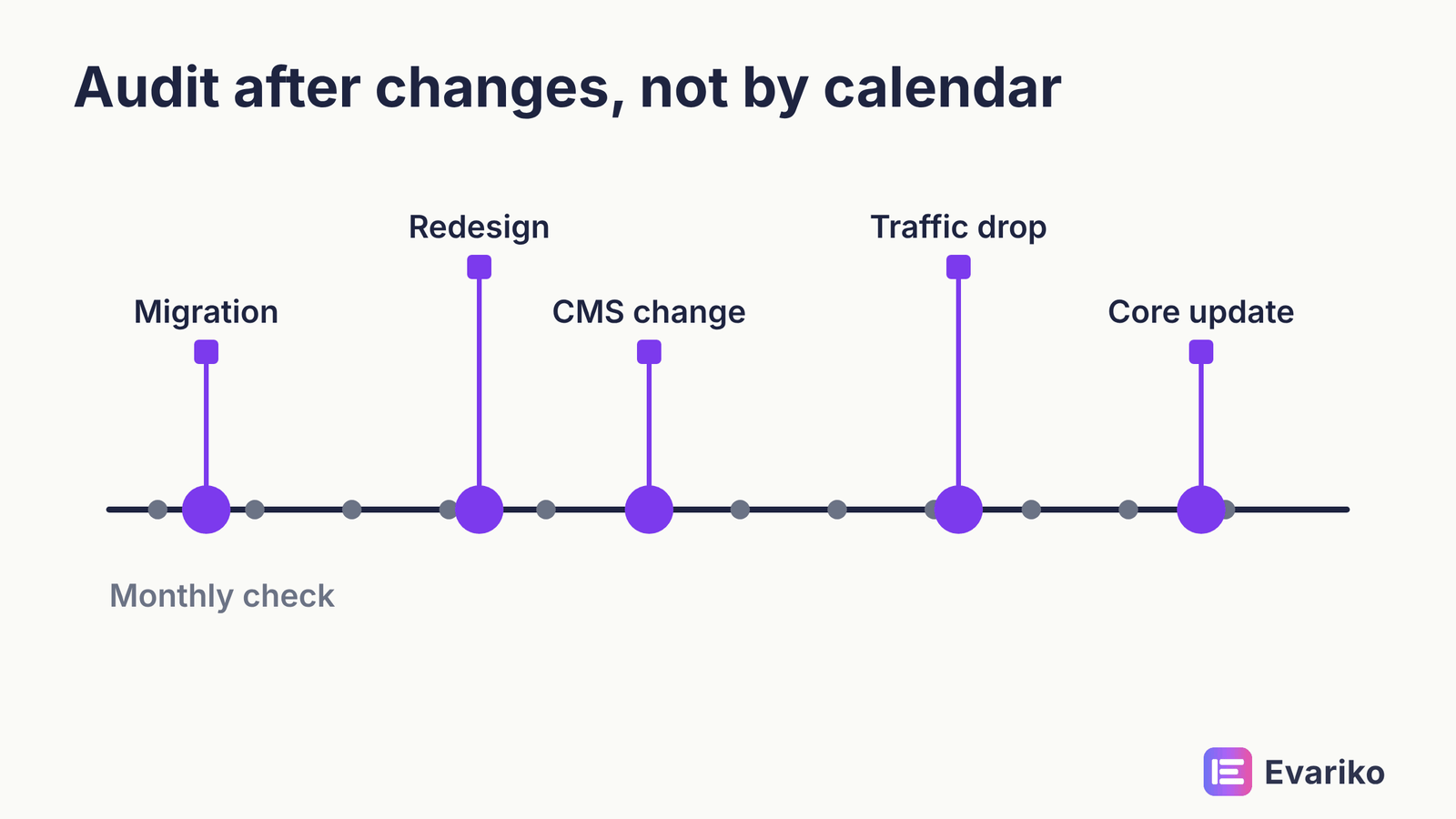
Run a full audit:
- Before and after a website migration, a domain change or an HTTPS move.
- After a redesign, a new theme or a template change.
- After a CMS, framework or rendering change.
- After an unexplained drop in impressions or indexed pages.
- After a confirmed Google core update, if your traffic moved.
Between those triggers, a monthly check of the Page Indexing report, the Core Web Vitals report, and the URL Inspection result for your top pages catches most problems before they spread. If traffic has already fallen, the guide to diagnosing an organic traffic drop sorts technical causes from the rest, and the guide to Google core updates covers what to do after one.
What Tools Do You Need for Technical SEO?
You need Google Search Console, a site crawler, and a page speed tool; most sites need nothing more. Evariko does not sell a tool, so the list below names what does the job rather than what earns a commission.
| Tool | What it does | Cost |
|---|---|---|
| Google Search Console | Indexing status, URL Inspection, robots.txt report, Core Web Vitals report, crawl stats | Free |
| Bing Webmaster Tools | Bing’s indexing and crawl data | Free |
| PageSpeed Insights | Field data from the Chrome UX Report plus a Lighthouse lab test | Free |
| Lighthouse (in Chrome DevTools) | Lab performance and mobile audit; Google’s replacement for the retired Mobile-Friendly Test | Free |
| Rich Results Test | Rich result eligibility and rendering check | Free |
| Schema Markup Validator | Schema.org validity for any structured data type | Free |
| Screaming Frog SEO Spider | Site crawl: status codes, directives, canonicals, internal links | Free up to 500 URLs; paid licence above |
Two retired Google tools still appear in guides on this topic. Google retired the standalone Mobile-Friendly Test, its API and the Mobile Usability report on 1 December 2023, and pointed users to Lighthouse. Google replaced the robots.txt Tester with the robots.txt report in Search Console. Do not plan an audit around either. The guide to SEO tools compares what each paid platform adds and what it cannot replace.
When Does Running Technical SEO In-House Stop Making Sense?
Running technical SEO in-house stops making sense when the earliest failing stage needs a change you cannot make yourself: a rendering change, a server change, or a migration. Discovery and indexing fixes (internal links, sitemaps, noindex tags, canonical tags) are within reach of most site owners with Search Console and a crawler. Rendering and server fixes usually need a developer. The diagnostic above tells you which group your problem falls into.
Which parts of technical SEO apply to a small site?
A small site needs the pipeline basics in full and can ignore most of the large-site work. Size changes how much work sits in each stage, not the order of the stages.
| Component | 50-page site | 5,000-page site | 500,000-page site |
|---|---|---|---|
| Internal linking and site architecture | Applies | Applies | Applies |
| XML sitemap | Applies | Applies | Applies, split by section |
| robots.txt | Applies (keep it simple) | Applies | Applies |
| Rendering and JavaScript SEO | Applies if the site uses client-side rendering | Applies | Applies |
| noindex and canonical tags | Applies | Applies | Applies |
| Mobile-first indexing | Applies | Applies | Applies |
| Core Web Vitals and page speed | Applies | Applies | Applies |
| Structured data | Applies | Applies | Applies |
| HTTPS | Applies | Applies | Applies |
| Redirects and status codes | Monitor | Applies | Applies |
| Crawl budget | Ignore | Monitor | Applies |
| Log file analysis | Ignore | Monitor | Applies |
| Faceted navigation and parameters | Ignore unless ecommerce | Applies to ecommerce | Applies |
| hreflang | Only if multi-language | Only if multi-language | Only if multi-language |
| Index pruning | Ignore | Monitor | Applies |
If your site has fifty pages, the bottom five rows are not where your problems are. Small sites mostly fail at discovery (thin internal linking), at rendering (page builders and scripts), and at indexing (stray noindex tags left after a launch). Large sites add crawl budget, log file analysis for reading crawler behaviour, faceted navigation control on filtered pages, and hreflang for language and region targeting.
How do technical fixes turn into revenue?
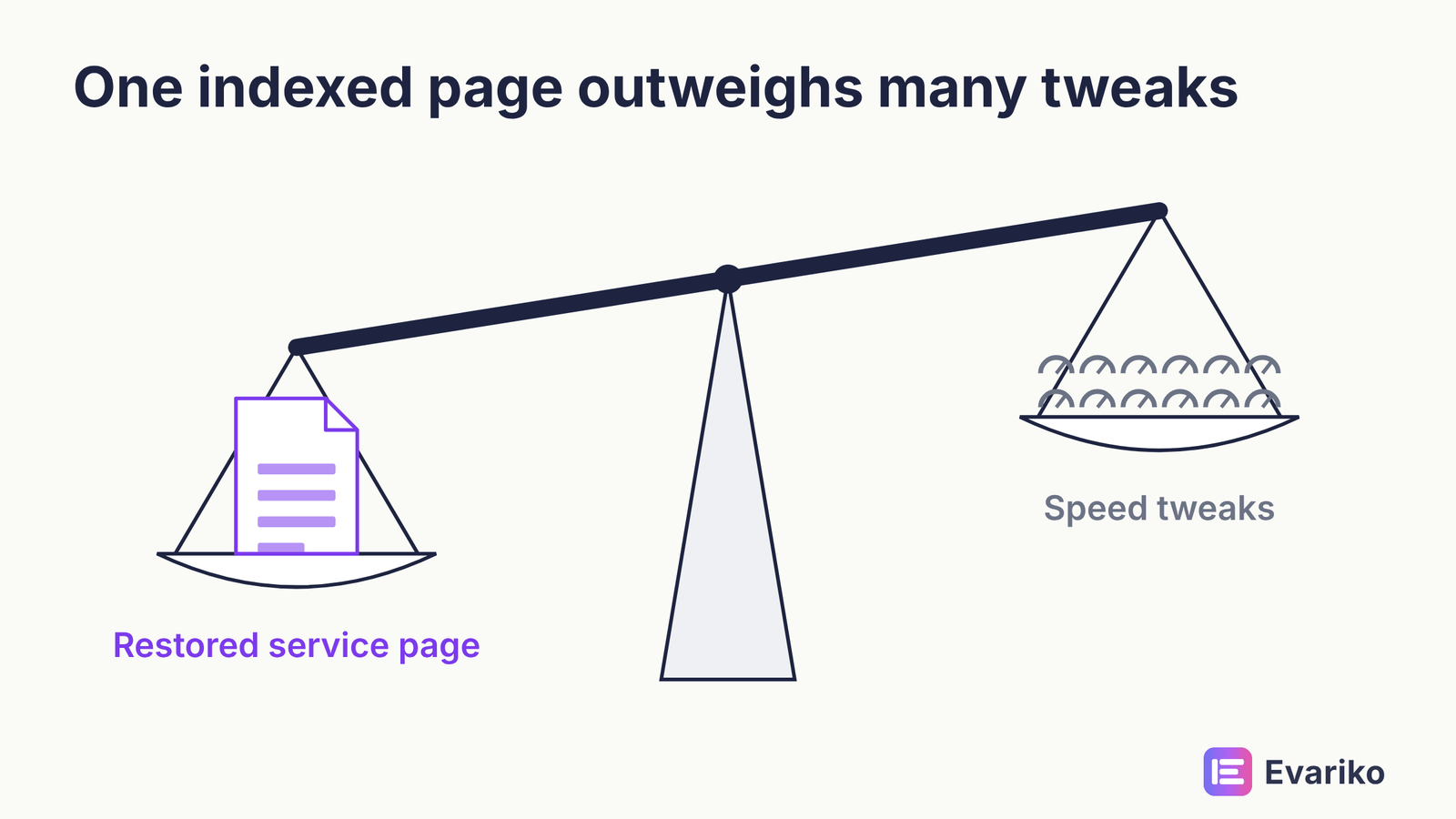
A technical fix turns into revenue only through a chain: more eligible pages produce more impressions, more impressions produce more clicks, and more clicks on commercial pages produce more enquiries. Each link in that chain can break. A fix that adds indexed pages nobody searches for adds nothing. A fix that restores a key service page to the index can matter more than a hundred speed improvements.
Measure the chain in order. Check the indexed count for the pages you care about, then impressions and clicks for those pages in the Performance report, then conversions in your analytics. The guide to measuring SEO success covers the analytics end.
What technical SEO is not
Several claims repeat across guides on this subject and are wrong.
- Technical problems do not cause penalties. Manual actions are for spam policy breaches. Technical faults reduce visibility through the pipeline.
- Accessibility is not an indexing gate. Accessibility matters for users and, in many markets, for law. Google indexes inaccessible pages.
- Page experience is not a primary ranking signal. Google says relevance comes first.
- AMP is not a current requirement. Google dropped the AMP requirement for Top Stories in 2021.
- llms.txt does not control AI crawlers. User-agent rules in robots.txt do.
Is HTTPS a ranking factor?
Yes. HTTPS is a confirmed ranking signal, and Google describes the signal as lightweight.
Does schema markup improve rankings?
No. Schema markup makes a page eligible for rich results, and rich results can raise click-through rate without changing position.
Can you do technical SEO without a developer?
Yes, for discovery and indexing fixes. Rendering and server fixes usually need a developer.
For sites where the earliest failing stage is a rendering, server or migration problem, Evariko runs a technical SEO audit that crawls the site, ranks problems by pages affected and stages blocked, and then fixes or documents each one for your developer. Whether you need that depends on which row of the diagnostic your pages are stuck at. Technical SEO, in the end, is the work of getting every page you care about through discovery, crawling, rendering and indexing, so that serving is the only stage left to compete on.